 bc81dc5a28
* [FIX] correct amount in fiat tracking (#1934)

* better debug log

* fix: convert msat to sat for fiat amount

* [CHORE] update to version 0.11.0 (#1933)

* [FIX] codeql for dev branch (#1935)

* [FEAT] create data folder if it doesnt exist (#1930)

* [FEAT] improve update_admin_settings (#1903)

* [FEAT] improve update_admin_settings

while working on the push notification pr i found it very hard just to update
2 settings inside the db, so i improved upon update_admin_settings.
now you just need to provide a dict with key/values you want to update inside db.

also debugging the endpoints for update_settings i found despite the type of `EditableSettings`
fastapi did in fact pass a dict.

* t

* use `EditableSettings` as param in update_settings

* fix settings model validation

we previously overrode the pydantic validation with our own method

* make `LnbitsSettings` a `BaseModel` and only add `BaseSettings` later

this allows us to instantiate `EditableSettings` without the environment values being loaded in

* add test

* forbid extra fields in update api

* fixup

* add test

* test datadir

* move UpdateSettings

* fix compat

* fixup webpush

---------

Co-authored-by: jacksn <jkranawetter05@gmail.com>

* [TEST] use clean db in postgres tests (#1928)

* [CORE] Document CoreLightningRestWallet (#1920)

* document CoreLightningRestWallet
* pushed to comment
* fixed base64 comment

---------

Co-authored-by: Ben <ben@arc.wales>

* [TEST] use test data as mockdata (#1929)

* add db group to cli

* delete mock_data.zip

* generate migration data through tests

* [BUG] self payments for the same wallet (#1914)

* [BUG] self payments for fakewallet

make it possible to pay to yourself on fakewallet

f

* bugfix selfpayments for fakewallet

* delete by wallet and fix previous_payment check (#1919)

---------

Co-authored-by: callebtc <93376500+callebtc@users.noreply.github.com>

* [REFACTOR] core/__init__ to not have circular import issues (#1876)

* F541 fix

remove unused workflow and combine linters into one

add lnbits/static to ruff ignore
remote setupnode

ignore upgrades for mypy

ignore F401 for __init__ files

unused noqa

ignore upgrades for black

F821: undefine name

disabled and logged webhook_listener for opennode and lnpay because they are obvisouly not working

E402: module level import not at top of file

fixup

revert breaking changes wait for PR #1876

https://github.com/lnbits/lnbits/pull/1876

E721 fixes, only popped up for python3.9 not 3.10

[REFACTOR] core/__init__ to not have circular import issues

WIP

add db for backwards compat

fix pyright

make mypy happy again

pyright did not catch those, i think mypy got confused with relative imports. maybe we should use absolute ones everywhere

E402: module level import not at top of file

dont forget to add core_app

rebase on ruff pr

f

remo

format

* fix clnrest

* ignore E402 in conftest

* refactoring issues

---------

Co-authored-by: jacksn <jkranawetter05@gmail.com>

* make wallets name prettier! (#1918)

* make wallets name prettier!

* Update lnbits/core/templates/admin/index.html

Co-authored-by: dni ⚡ <office@dnilabs.com>

* Update lnbits/core/templates/admin/index.html

Co-authored-by: dni ⚡ <office@dnilabs.com>

---------

Co-authored-by: Arc <33088785+arcbtc@users.noreply.github.com>
Co-authored-by: dni ⚡ <office@dnilabs.com>

* Fix payments chart (#1851)

* feat: payment history endpoint

* test payment history

* use new endpoint in frontend

* refactor tests

* [CHORE] bugfix formatting prettier (#1936)

* do not show deleted wallets (#1942)

* do not show deleted wallets

* rename parameter for clarity

* extension loader: do not panic! (#1945)

* Revert "do not show deleted wallets (#1942)" (#1947)

This reverts commit 1ee2d53069.

* remove LNURL-p description_hash validation (#1951)

* [CHORE] update dependencies, unsafe pip packages, fastapi (#1609)

* d

* middleware needs to be initialised before startup

runs on python3.11

update secp256k1

update psycopg

* update fastapi to v0.103

* fix webpush

* bump dependencies

* ruff issue

* lock versions

* bump versions

---------

Co-authored-by: jacksn <jkranawetter05@gmail.com>

* [FEAT] Focus cursor to textarea (#1959)

* Focus cursor to textarea

Fix need for additional click to textarea before pasting

* [FEAT] autofocus textarea on paste request

closes #1959

* format arba

* bundle

---------

Co-authored-by: dni ⚡ <office@dnilabs.com>

* add editorconfig config, fix issues (only whitespace changes) (#1958)

* adding bolt11 lib and removing bolt11.py from the codebase (#1817)

* add latest bolt11 lib

decode exception handling for create_payment
fix json response for decode
bugfix hexing description hash
improvement on bolt11 lib
update to bolt11 2.0.1
fix clnrest
* bolt 2.0.4
* refactor core/crud.py

* catch bolt11 erxception clnrest

* Updated guide for extension development for current extension management process (#1962)

* Startup optimization: nonblocking expiry check (#1943)

* nonblocking expiry check
* autoruff
* smaller interval

---------

Co-authored-by: dni ⚡ <office@dnilabs.com>

* Support custom path for installed extensions (#1940)

* feat: the more you fuck around the more you learn
* feat: backwards compatible static file loading
* refactor: update paths for extension files
* refactor: var renaming
* doc: update `LNBITS_EXTENSIONS_PATH` documentation
* fix: default folder install
* feat: install ext without external path
* doc: `PYTHONPATH` no longer required
* fix: add warnings
* fix: missing path
* refactor: re-order statements
* fix: hardcoded path separator

---------

Co-authored-by: dni ⚡ <office@dnilabs.com>

* [FEAT] Node Managment (#1895)

* [FEAT] Node Managment

feat: node dashboard channels and transactions
fix: update channel variables
better types
refactor ui
add onchain balances and backend_name
mock values for fake wallet
remove app tab
start implementing peers and channel management
peer and channel management
implement channel closing
add channel states, better errors
seperate payments and invoices on transactions tab
display total channel balance
feat: optional public page
feat: show node address
fix: port conversion
feat: details dialog on transactions
fix: peer info without alias
fix: rename channel balances
small improvements to channels tab
feat: pagination on transactions tab
test caching transactions
refactor: move WALLET into wallets module
fix: backwards compatibility
refactor: move get_node_class to nodes modules
post merge bundle fundle
feat: disconnect peer
feat: initial lnd support
only use filtered channels for total balance
adjust closing logic
add basic node tests
add setting for disabling transactions tab
revert unnecessary changes
add tests for invoices and payments
improve payment and invoice implementations
the previously used invoice fixture has a session scope, but a new invoice is required
tests and bug fixes for channels api
use query instead of body in channel delete
delete requests should generally not use a body
take node id through path instead of body for delete endpoint
add peer management tests
more tests for errors
improve error handling
rename id and pubkey to peer_id for consistency
remove dead code
fix http status codes
make cache keys safer
cache node public info
comments for node settings
rename node prop in frontend
adjust tests to new status codes
cln: use amount_msat instead of value for onchain balance
turn transactions tab off by default
enable transactions in tests
only allow super user to create or delete
fix prop name in admin navbar

---------

Co-authored-by: jacksn <jkranawetter05@gmail.com>

* [FEAT] cleanup GET /wallet endpoint, add wallet api routes (#1932)

* [FEAT] cleanup GET /wallet endpoint, add wallet api route
this removes the functionalitiy to create accounts and wallets via
the GET /wallet endpoint in generic.py

it add endpoints inside the api.py for it and the frontend is modified to use the api endpoints

this also simplifies for the `feat/login` for the route.

* remove stale generic tests and add api tests

* bug wrong endpoint create account

* vlad nitpick

* added checkif deleted is 404

* reload after renaming wallet

* another iteration with vlad

* create new wallet if it none exist

* fix delete refresh

* formatting

* Don't create user if allowed users is set (#1822)

* dont allow creating of users when allowed users are set
* add info to .env.example

---------

Co-authored-by: dni ⚡ <office@dnilabs.com>

* fix typos (#1969)

* fix: node ranks (#1968)

* [BUG] bundle is broken (#1972)

* [BUG] Fix bad transation call (#1973)

* fix: `:label="$('xxx')` to :label="$t('xxx')

* chore: commit bundles

* chore: remove extra file

* fix: catch sse exceptions (#1971)

* Add Markdown capability globally (#1965)

* add markdown capability globally

* add markdown to site description

* add showdown to package.json

remove it from vendor.json, its bundled

* formatting

* io

* Update lnbits/core/templates/core/index.html

---------

Co-authored-by: dni ⚡ <office@dnilabs.com>

* feat: remove commit version (#1980)

* nix: fix nixosModule and build (#1979)

* lnbits/settings: get LNBITS_COMMIT from envvar if available

There is no other way of setting the git commit at runtime, for build systems like Nix that allow you to hermetically define envvars derived from the source that will be available reproducibly at runtime

* nix: update potree2nix and nixosModule

This is a general refactor that gets everything building and passing the vmTest again

* Update nix/modules/lnbits-service.nix

---------

Co-authored-by: Pavol Rusnak <pavol@rusnak.io>

* catch exceptions in migrations for extensions (#1987)

* fix: admin_ui js error (#1982)

* fix: admin_ui js error

undefined formData.lnbits_allowed_currencies JS error in console

* vlad suggestion

* update: to 0.11.1

* revert: update

---------

Co-authored-by: jackstar12 <62219658+jackstar12@users.noreply.github.com>
Co-authored-by: dni ⚡ <office@dnilabs.com>
Co-authored-by: jacksn <jkranawetter05@gmail.com>
Co-authored-by: Ben <ben@arc.wales>
Co-authored-by: Tiago Vasconcelos <talvasconcelos@gmail.com>
Co-authored-by: Arc <33088785+arcbtc@users.noreply.github.com>
Co-authored-by: arbadacarba <63317640+arbadacarbaYK@users.noreply.github.com>
Co-authored-by: Pavol Rusnak <pavol@rusnak.io>
Co-authored-by: blackcoffeexbt <87530449+blackcoffeexbt@users.noreply.github.com>
Co-authored-by: Vlad Stan <stan.v.vlad@gmail.com>
Co-authored-by: Matthew Croughan <matt@croughan.sh>
21 KiB
layout, title, nav_order
| layout | title | nav_order |
|---|---|---|
| default | FAQ | 5 |
FAQ - Frequently Asked Questions
Install options
- Configure allowed users & extensions in the .env file
- Configure allowed users & extensions via the Usermanager-Extension. You can find more info about the superuser and the admin extension here
LNbits is not a node management software but a ⚡️LN only accounting system on top of a funding source.
Funding my LNbits wallet from my node it doesn't work.
If you want to send sats from the same node that is the funding source of your LNbits, you will need to edit the lnd.conf file. The parameters to be included are:
allow-circular-route=1
allow-self-payment=1
Funding source only available via tor (e.g. Start9 or Umbrel)
If you want your setup to stay behind tor then only apps, pos and wallets that have tor activated can communicate with your wallets. Most likely you will have trouble when people try to redeem your voucher through onion or when importing your lnbits wallets into a wallet-app that doesnt support tor. If you plan to let LNbits wallets interact with plain internet shops and services you should consider setting up hybrid mode for your node.
Funding source is in a cloud
This means that you might not have access to some files which would allow certain administrative functions. E.g. on Voltage lnd.conf can not be edited. Payments from your node to LNbits wallets can therefore not be configurated in this case atm so you will need to take an extra wallet to send from funding source->wallet x->LNbits wallet (only) for the initial funding of the wallet.
LNbits via clearnet domain
Step by step guide how to convert your Tor only node into a clearnet node to make apps like LNbits accessible via https.
Which funding sources can I use for LNbits?
There are several ways to run a LNbits instance funded from different sources. It is important to choose a source that has a good liquidity and good peers connected. If you use LNbits for public services your users´ payments can then flow happily in both directions. If you would like to fund your LNbits wallet via btc please see section Troubleshooting.
The LNbits manual shows you which sources can be used and how to configure each: CLN, LND, LNPay, Cliche, OpenNode as well as bots.
Can I prevent others from generating wallets on my node?
When you run your LNbits in clearnet basically everyone can generate a wallet on it. Since the funds of your node are bound to these wallets you might want to prevent that. There are two ways to do so:
Please note that all entries in the .env file will not be the taken into account once you activated the admin extension.
Troubleshooting
-
LNbits is running via Tor only, you can't open it on a public domain like lnbits.yourdomain.com
- Given that you want your setup to stay like this open your LNbits wallet using the .onion URI and create it again. In this way the QR is generated to be accessible via this .onion URI so via tor only. Do not generate that QR from a .local URI, because it will not be reachable via internet - only from within your home-LAN.
- Open your LN wallet app that you used to scan that QR and this time by using tor (see wallet app settings). If the app doesn't offer tor, you can use Orbot (Android) instead. See section Installation->Clearnet for detailed instructions.
-
LNbits is running via Tor only, you want to offer public LN services via https
- For this we need to partially open LNbits to a clearnet (domain/IP) through a https SSL certificate. Follow the instructions from this LNbits caddy installation instruction. You need to have a domain and to be able to configure a CNAME for your DNS record as well as generate a subdomain dedicated to your LNbits instance like eg. lnbits.yourdomain.com. You also need access to your internet router to open the https port (usually 443) and forward it your LNbits IP within your LAN (usually 80). The ports might depend on your node implementation if those ports do not work please ask for them in a help group of your node supplier.
- You can also follow the Apache installation option, explained in the LNbits installation manual.
- If you run LNbits from a bundle node (myNode, Start9, Umbrel,Raspiblitz etc), you can follow this extensive guide with many options to switch your Tor only LNbits into a clearnet LNbits. For Citadel there is a HTTPS Option in your manual to activate https for LNbits in the newest version.
-
Wallet on demo server legend.lnbits
Always save a copy of your wallet-URL, Export2phone-QR or LNDhub for your own wallets in a safe place. LNbits CANNOT help you to recover them when lost.
-
Wallet on your own funding source/node
Always save a copy of your wallet-URL, Export2phone-QR or LNDhub for your own wallets in a safe place. You can find all LNbits users and wallet-IDs in your LNbits user manager extension or in your sqlite database. To edit or read the LNbits database, go to the LNbits /data folder and look for the file called sqlite.db. You can open and edit it with excel or with a dedicated SQL-Editor like SQLite browser.
-
A - Via an external swap service
If the user do not have full access of your LNbits, is just an external user, can use swap services like Boltz, FixedFloat, DiamondHands or ZigZag.
This is useful if you provide only LNURL/LN invoices from your LNbits instance, but a payer only has onchain sats so they will have to the swap those sats first on their side.
The procedure is simple: user sends onchain btc to the swap service and provides the LNURL / LN invoice from LNbits as destination of the swap.
-
B - Using the Onchain LNbits extension
Keep in mind that this is a separate wallet, not the LN btc one that is represented by LNbits as "your wallet" upon your LN funding source. This onchain wallet can be used also to swap LN btc to (e.g. your hardwarewallet) by using the LNbits Boltz or Deezy extension. If you run a webshop that is linked to your LNbits for LN payments, it is very handy to regularly drain all the sats from LN into onchain. This leads to more space in your LN channels to be able to receive new fresh sats.
Procedure:
- Use Electrum or Sparrow wallet to create a new onchain wallet and save the backup seed in a safe place
- Go to wallet information and copy the xpub
- Go to LNbits - Onchain extension and create a new watch-only wallet with that xpub
- Go to LNbits - Tipjar extension and create a new Tipjar. Select also the onchain option besides the LN wallet.
- Optional - Go to LNbits - SatsPay extension and create a new charge for onchain btc. You can choose between onchain and LN or both. It will then create an invoice that can be shared.
- Optional - If you use your LNbits linked to a Wordpress + Woocommerce page, once you create/link a watch-only wallet to your LN btc shop wallet, the customer will have both options to pay on the same screen.
Message "https error" or network error" when scanning a LNbits QR
Bad news, this is a routing error that might have quite a lot of reasons. Let´s try a few of the most possible problems and their solutions. First choose your setup
Wallet-URL deleted, are my funds safu ?
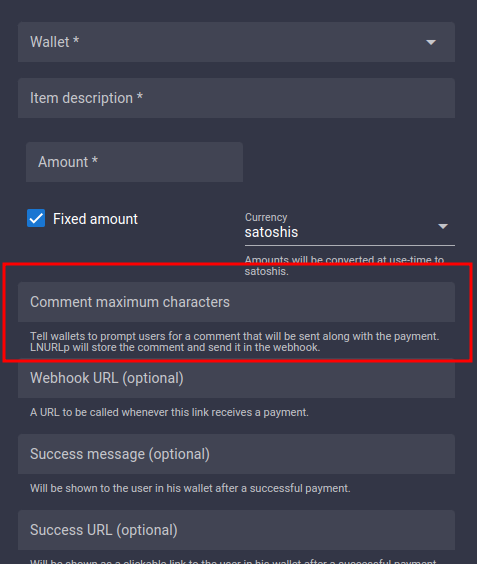
Configure a comment that people see when paying to my LNURLp QR
When you create a LNURL-p, by default the comment box is not filled. That means comments are not allowed to be attached to payments.
In order to allow comments, add the characters lenght of the box, from 1 to 250. Once you put a number there, the comment box will be displayed in the payment process. You can also edit a LNURL-p already created and add that number.
Can I deposit onchain BTC to LNbits ?
There are multiple ways to exchange sats from onchain btc to LN btc (resp. to LNbits).
Where can I see payment details?
When you receive a payment in LNbits, the transaction log will display only a resumed type of the transaction.
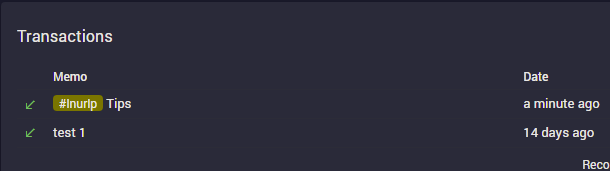
In your transaction overview you will find a little green arrow for received and a red arrow for sended funds.
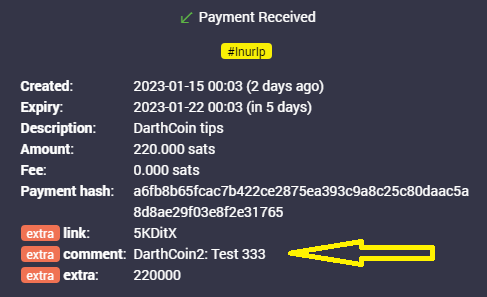
If you click on those arrows, a details popup shows attached messages as well as the sender´s name if given.
Can I configure a name to the payments i make?
In LNbits this is currently not possible to do - but to receive. This is only possible if the sender's LN wallet supports LUD-18 (nameDesc) like e.g. Open Bitcion Wallet - OBW does. You will then see an alias/pseudonym in the details section of your LNbits transactions (click the arrows). Note that you can give any name there and it might not be related to the real sender´s name(!) if your receive such.
How can I use a LNbits lndhub account in other wallet apps?
Open your LNbits with the account / wallet you want to use, go to "manage extensions" and activate the LNDHUB extension.
Then open the LNDHUB extension, choose the wallet you want to use and scan the QR code you want to use: "admin" or "invoice only", depending on the security level you want for that wallet.
You can use Zeus or Bluewallet as wallet apps for a lndhub account.
Keep in mind: if your LNbits instance is Tor only, you must use also those apps behind Tor and open the LNbits page through your Tor .onion address.
Building hardware tools
- LNPoS Online interactive Lightning payments
- LNURLPoS Offline Lightning Payments. Passive interaction, sharing a secret as evidence
- OnChain For onchain payments. Generates an address and displays a link for verification
- LNURLATM Offline Lightning Payouts. Generates LNURLw link to do withdrawals
- MakerBits - Telegram support group
- Instructions for LNpos, Switch, ATM, BTCticker - guides in DE & EN
- LNbits shop - readymade hardware gimmicks from the community
- Collection of hardware projects using LNbits
LNbits has all sorts of open APIs and tools to program and connect to a lot of different devices for a gazillion of use-cases. Let us know what you did with it ! Come to the Makerbits Telegram Group if you are interested in building or if you need help with a project - we got you!
ATM - deposit and withdraw in your shop or at your meetup
This is a do-it-yourself project consisting of a mini-computer (Raspberry Pi Zero), a coin acceptor, a display, a 3D printed case, and a Bitcoin Lightning wallet as a funding source. It exchanges fiat coins for valuable Bitcoin Lightning ⚡ Satoshis. The user can pick up the Satoshis via QR code (LNURL-withdraw) on a mobile phone wallet. You can get the components as individual parts and build the case yourself e.g. from Fulmo who also made a guide on it. The shop offers payments in Bitcoin and Lightning ⚡. The code can be found on the ATM github project page>.
POS Terminal - an offline terminal for merchants
The LNpos is a self-sufficient point of sale terminal which allows offline onchain payments and an offline Lightning ATM for withdrawals. Free and open source software, free from intermediaries, with integrated battery, WLAN, DIY. You can get the 3D print as well as the whole kit from the LNbits shop from 👇 Resources. It allows

Hardware Wallet- build your own, stack harder
The hardwarewallet is a very cheap solution for builders. The projects´ code and installation instructions for the LNbits hardware wallet can be found on github

Bitcoin Switch - turn things on with bitcoin
Candy dispenser, vending machines (online), grabbing machines, jukeboxes, bandits and all sorts of other things have already been build with LNbits´ tools. Further info see 👇 Resources.

Vending machine (offline)
This code works similar to the LNpos. Note that the setup-video for the vending machine misses the new way of installing it via the new LNURLdevices extension. The vending machine project code resides on github.

Resources - Building hardware tools
Use cases of LNbits
- Voucher can as well be printed directly from LNbits. After you created it, click the "eye" next to the link. By pressing the printer-button you print the plain QR but you could as well integrate it into a nice tippincard or voucher template by choosing "Advanced voucher" -> "Use custom voucher design". We collected some designs as well as templates to make your own ones under this LNbits voucher video-guide.. You will be able to create and print as much voucher as you like with it. Happy orangepilling!
- Note that your LNbits needs to be reachable in clearnet to offer vouchers to others.
- On top to just printing voucher for your wallet you can also write these LNURLw to a simple NFC card fromon NTAG216 by not clicking the printer but the NFC symbol on android/chrome and tapping your card against the device. This will enable the cardholder to directly spend those sats at a tpos, pos or wallet-app another one uses that can handle lightning payments via NFC.
- If you run an event and want to hand out bigger amounts of cards with simple voucher links on consider this NFC-brrr batch tool as well as using NTAG424 cards, so that your customers can rewrite them later with an own wallet and the boltcard service (see ff)
- For bigger amounts the Boltcard-Extension should be used. It will generate a link that sends a new invoice every time it is used for payments and keeps track too if the allowed card-ID is redeeming funds. Hence the setup of Boltcards is a bit safer but it needs some additional tools. You can find further infos on creating or updating boltcards here.
Merchant
LNbits is a powerful solution for merchants, due to the easy setup with various extensions, that can be used for many scenarios.
Here is an overview of the LNbits tools available for a small restaurant as well as a hotel
Swapping ⚡️LN BTC to a BTC address
LNbits has two swap extensions integrated: Boltz and Deezy.
For a merchant that uses LNbits to receive BTC payments through LN, this is very handy to move the received sats from LN channels into onchain wallets. It not only helps you HODLing but is also freeing up "space in your channels" so you are ready to receive more sats.
Boltz has an option to setup an automated swap triggered by a certain amount received.
Voucher
Printed voucher links or tippingcards
To generate voucher you will need LNbits to be available in clearnet. Please consider running your own LNbits instance for this.
LNURLw are strings that represent a faucet-link to a wallet. By scanning it, everyone will be able to withdraw sats from it. A LNURLw can be either a QR that leads to a static link or to one that responds with new invoices every time it is scanned (click "no assmilking"). You can create these QR by adding the LNURLw extension and generate the vouchertype you need.
NFC Cards, Badges, Rings etc.
Creating a NFC card for a wallet
To generate links for your cards you will need LNbits to be available in clearnet. Please consider running your own LNbits instance for this.