LNbits is not a node management software but a lightning only accounting system on top of a funding source.
You will need to edit the lnd.conf file for this. The parameter to be included are allow-circular-route=1 respectively allow_self_payment=1.
Voltage: lnd.conf cannot be edited atm
trezor hannes
The new LNbits manual shows you which sources you can use and how to configure each here
When you run your LNbits in clearnet basically everyone can generate a wallet on it. Since the funds of your node are bound to these wallets you might want to prevent that. There are two ways to do so
Can I prevent others from generating wallets on my node?
Bad news, this is a routing error that might have quite a lot of reasons. Lets try a few of the most possible problems and their solutions.
A - LNbits is running behind Tor only, you can't open it on a public domain like lnbits.yourdomain.com
B - If you run your LNbits over Tor and want to offer public LN services, you should consider to move it to a clearnet (domain/IP) access, with https SSL certificate.
Always save a copy of your wallet-URL, Export2phone-QR or LNDhub for your own wallets in a safe place. LNbits CANNOT help you to recover them when lost.
Wallet on demo server legend.lnbits
Always save a copy of your wallet-URL, Export2phone-QR or LNDhub for your own wallets in a safe place. You can find all LNbits wallet-IDs in your LNbits database.
Wallet on your own funding source/node
LNbits has all sorts of open APIs and tools to program and connect to a lot of different devices for several use-cases. Let us know what you did with it ! Come to the Makerbits Telegram Group if you are interested in building with LNbits or if you need help with a projekt - we got you!
Candy dispenser, vending machines (online), grabbing machines, jukeboxes, bandits and all sorts of other things have already been build with LNbits´ tools.
Ressources
To write cards you will need LNbits to be available in clearnet. Please consider running your own LNbits instance for this. To write cards you will need LNbits to be available in clearnet. Please consider running your own LNbits instance for this.Printed voucher links or tippingcards
LNURLw are strings that represent a faucet-link to a wallet. By scanning it, everyone will be able to withdraw sats from it. A LNURLw can be either a QR that leads to a static link or to one that responds with new invoices every time it is scanned (click "no assmilking"). You can create these QR by adding the LNURLw extension and generate the vouchertype you need.
Creating a NFC card for a wallet
Ressources
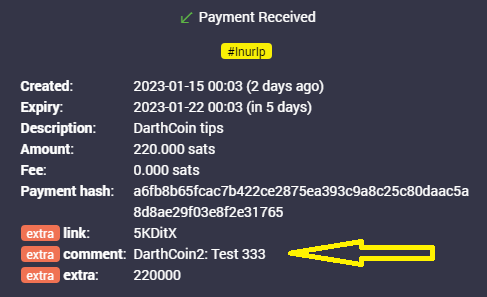
When you receive a payment in Lnbits, the transaction log will display only a resumed type of the transaction. Like this: 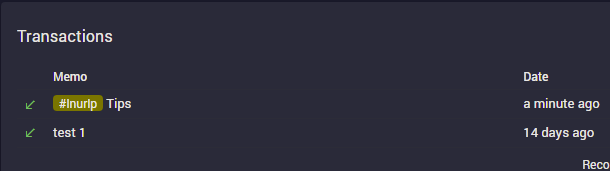 As you can see on the left side, there's a little green arrow for receiveing or red arrow for sending. If you click on that arrow, will popup a screen with more details about the transaction, including the message and the name attached to the payment.
If the sender's LN wallet support LUD-18 (nameDesc) will also insert an alias/pseudonym preceeding the comment. This is optional and only if the sender want to send that name. It can be any name and not related to real names.
When you create a LNURL-p, by default the comment box is not filled. That means comments are not allowed to be attached to payments. In order to allow comments, add the characters lenght of the box, from 1 to 250. Once you put a number there, the comment box will be displayed in the payment process. You can also edit a LNURL-p already created and add that number. 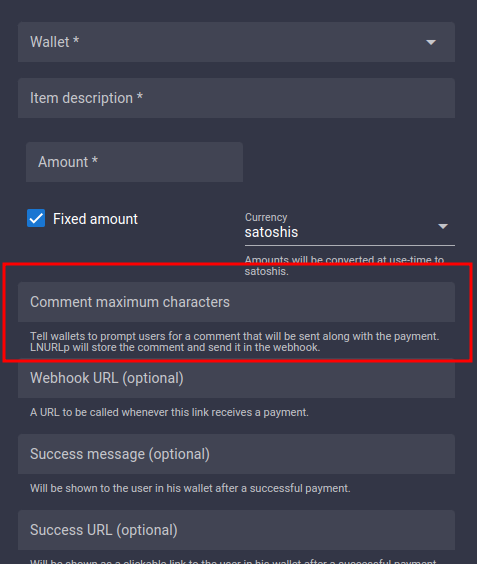
There are multiple ways to exchange sats from onchain btc to LN btc (resp. to LNbits).
A - Via a swap service like Boltz, FixedFloat, DiamondHands or ZigZag.
This is useful if you provide only LNURL/LN invoices from your LNbits instance, but a payer only has onchain sats so they will have to the swap those sats first on their side.
The procedure is simple: user sends onchain btc to the swap service and provides the LNURL / LN invoice from LNbits as destination of the swap.
B - Using the Onchain LNbits extension
Keep in mind that this is a separate wallet, not the LN btc one that is represented by LNbits as "your wallet" upon your LN funding source. This onchain wallet can be used also to swap LN btc to (e.g. your hardwarewallet) by using the LNbits Boltz or Deezy extension. If you run a webshop that is linked to your LNbits for LN payments, it is very handy to regularily drain all the sats from LN into onchain. This leads to more space in your LN channels to be able to receive new fresh sats.
Procedure